The best computer speakers depend on your desk space, preferred connections, and whether you want a compact stereo pair or deeper bass from a subwoofer. These picks range from simple plug-and-play desktop audio to flexible systems for music, gaming, and broader room listening.
Quick Top Products
Audioengine A2+ Wireless

- Built for nearfield listening on a desk.
- USB-C audio, Bluetooth, RCA, and AUX provide several input options.
- Real wood cabinets and an integrated 24-bit DAC.
Best For: A compact desk setup for listeners who want Bluetooth and direct USB-C audio.

Nylavee SK400 Computer Speakers

- Uses USB for power and 3.5mm for audio; no Bluetooth.
- Six touch-controlled lighting modes.
- A single knob controls power and volume.
Best For: Budget-minded desktop users who want straightforward wired audio and adjustable lighting.
SteelSeries Arena 7
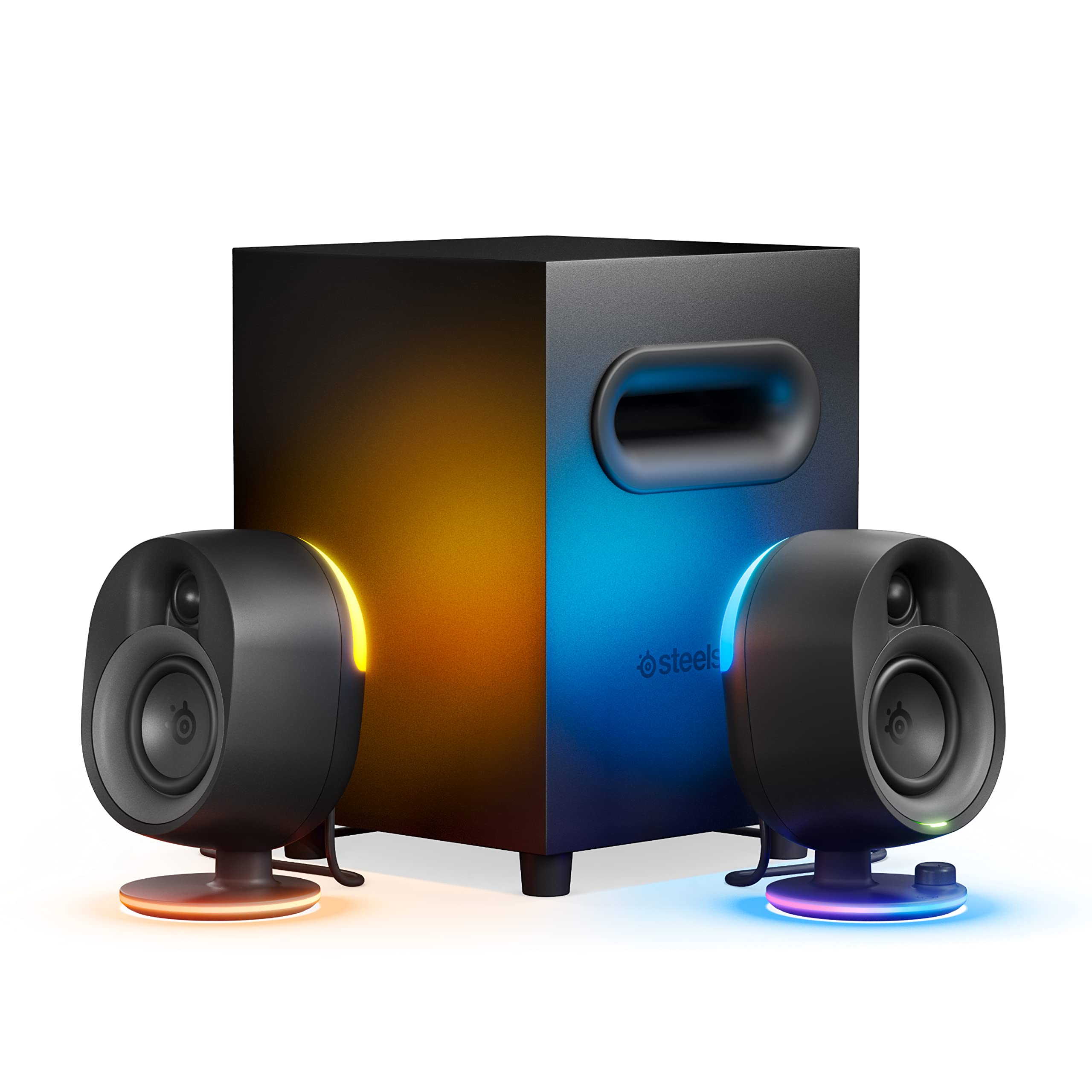
- Includes a 6.5-inch downward-firing subwoofer.
- Four-zone lighting reacts to screen events and music.
- Supports USB, Aux, optical, wired headset, and Bluetooth connections.
Best For: PC and console gamers seeking a subwoofer, Bluetooth, and customizable lighting.
Audioengine A5+
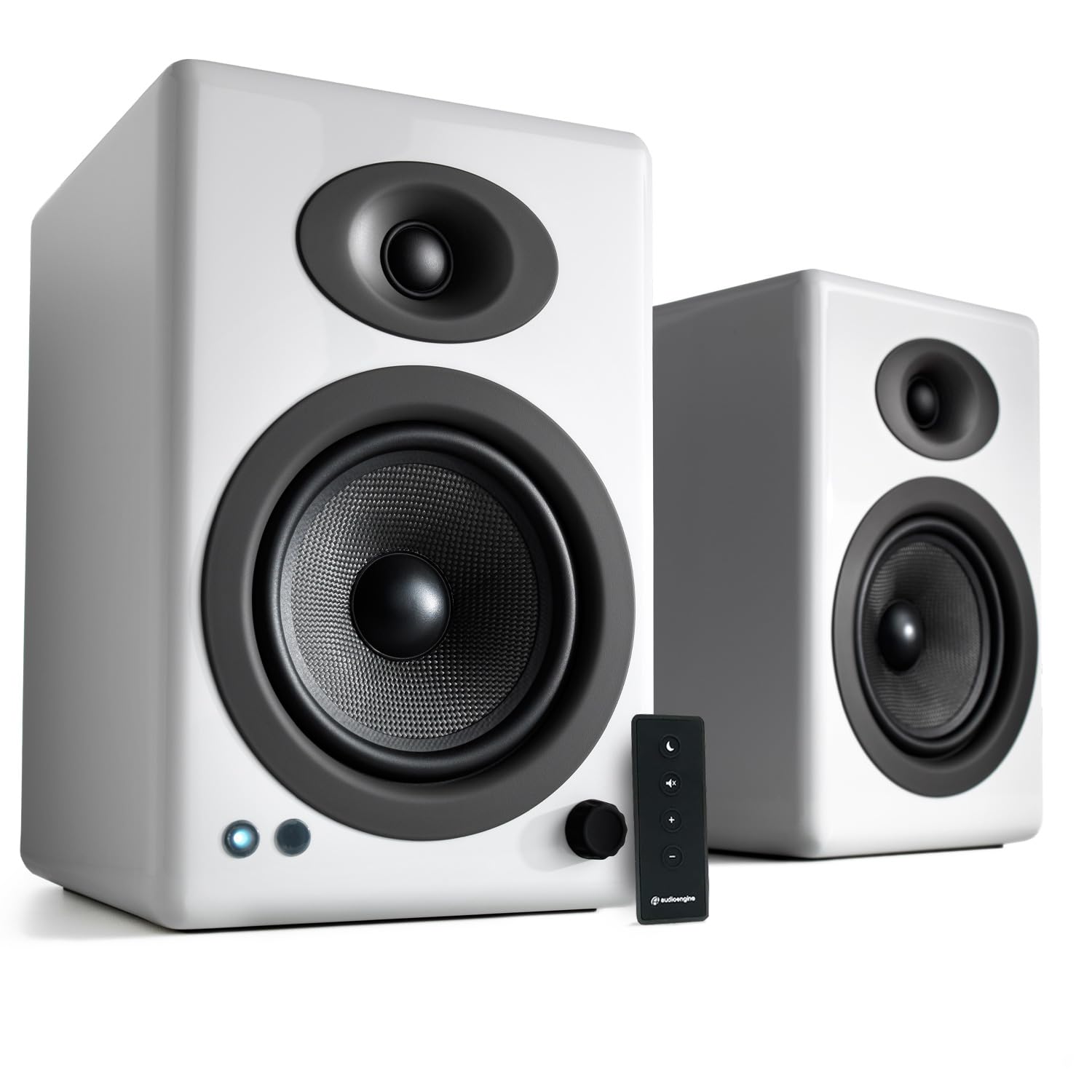
- Provides RCA and 3.5mm AUX connections for computers and other devices.
- The product notes specify 150 watts of audio output.
- Uses handcrafted wood cabinets.
Best For: Listeners who want powerful wired speakers for a computer and other room audio sources.
Audioengine A2 HD (HD3)
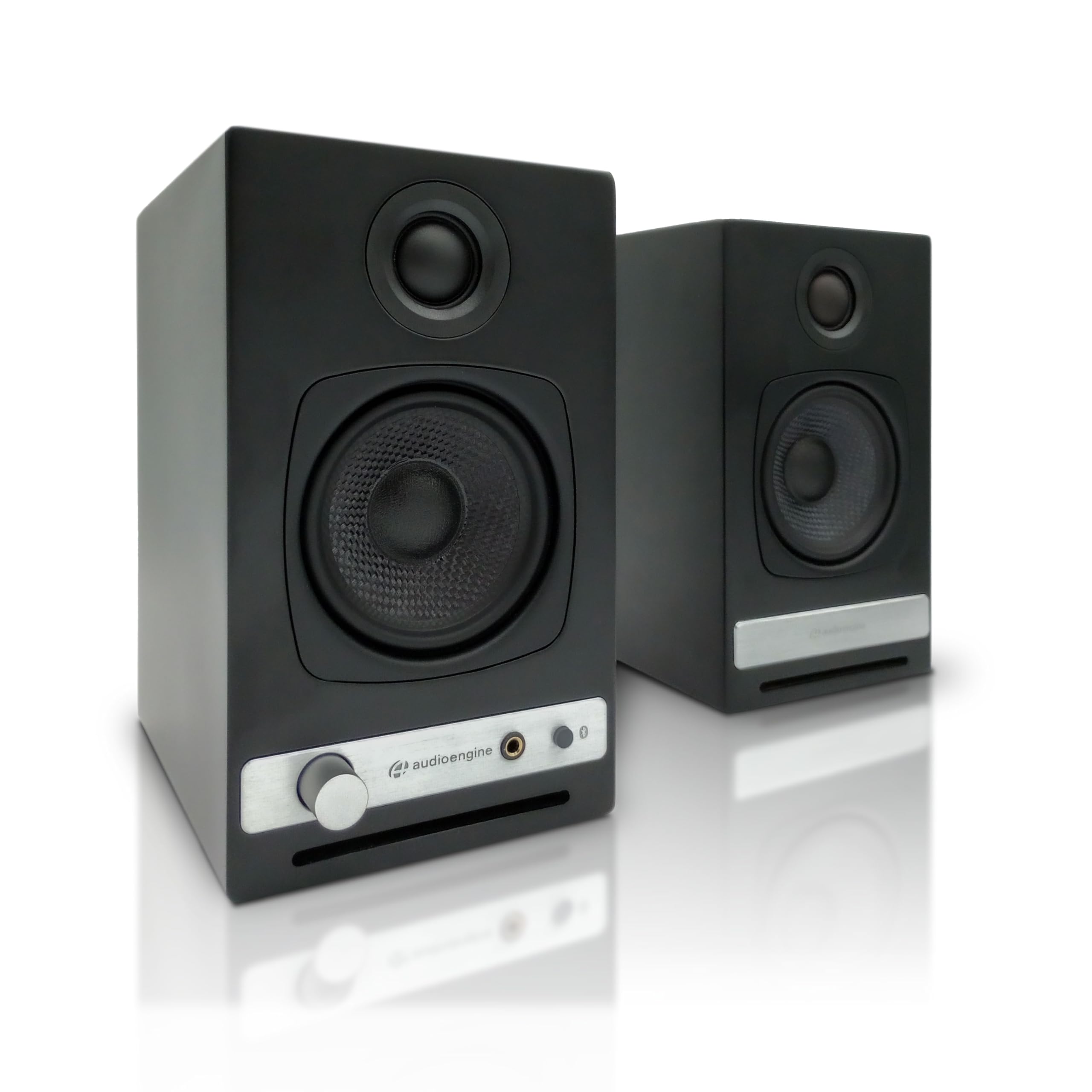
- Has a built-in headphone amplifier and front-panel output.
- Bluetooth aptX HD and USB DAC support wireless or wired computer audio.
- Offers USB, RCA, and 3.5mm AUX inputs.
Best For: Computer listeners who switch between speaker playback and wired headphones.
Nylavee SK700 Computer Speakers
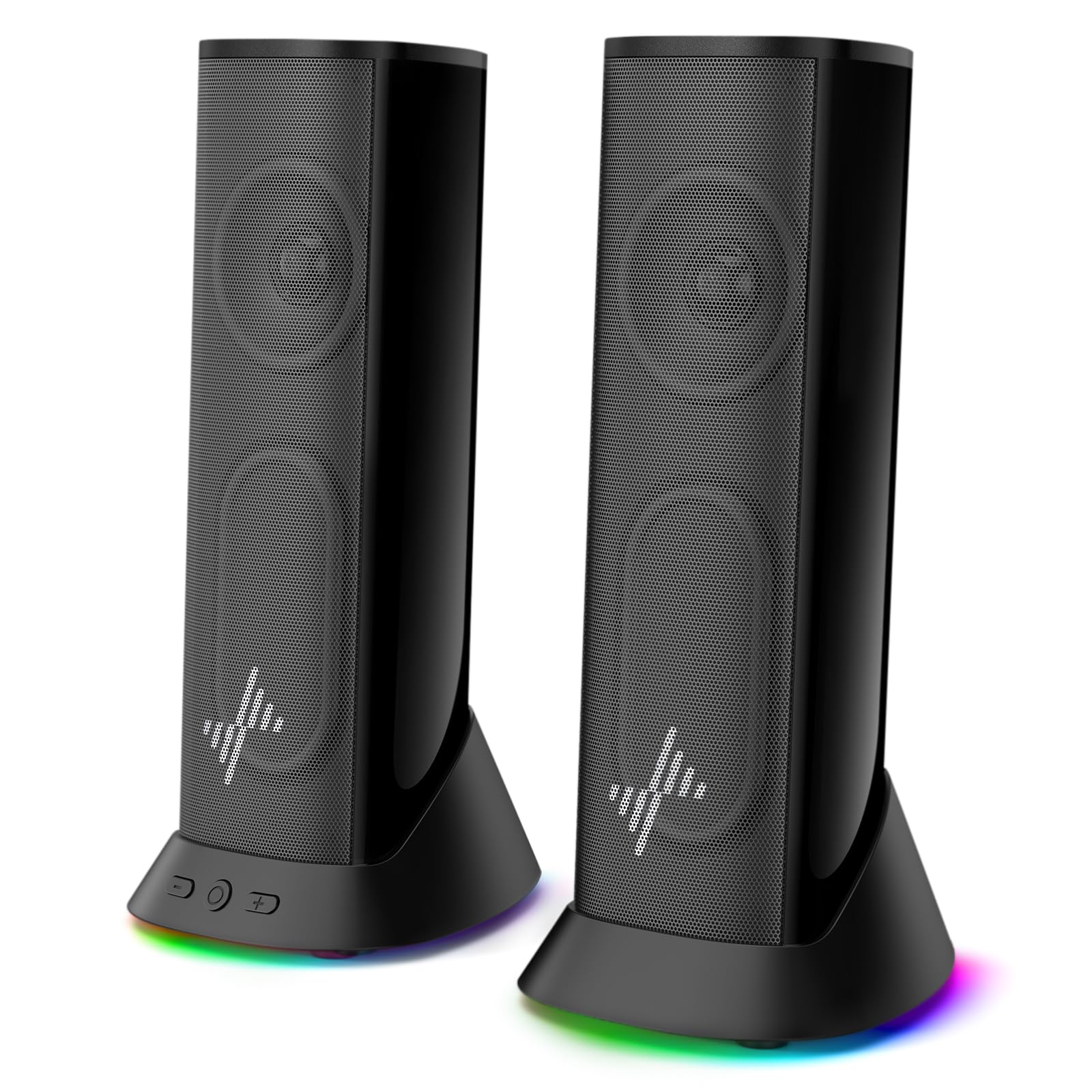
- Nine lighting modes can be changed or switched off.
- Uses USB power and 3.5mm AUX audio with no driver setup.
- The cable is 4.5 feet long for desktop placement flexibility.
Best For: Users who want a slim desktop speaker pair with wired plug-and-play connections and lighting options.
Nylavee SK100Pro 2.1 Speakers
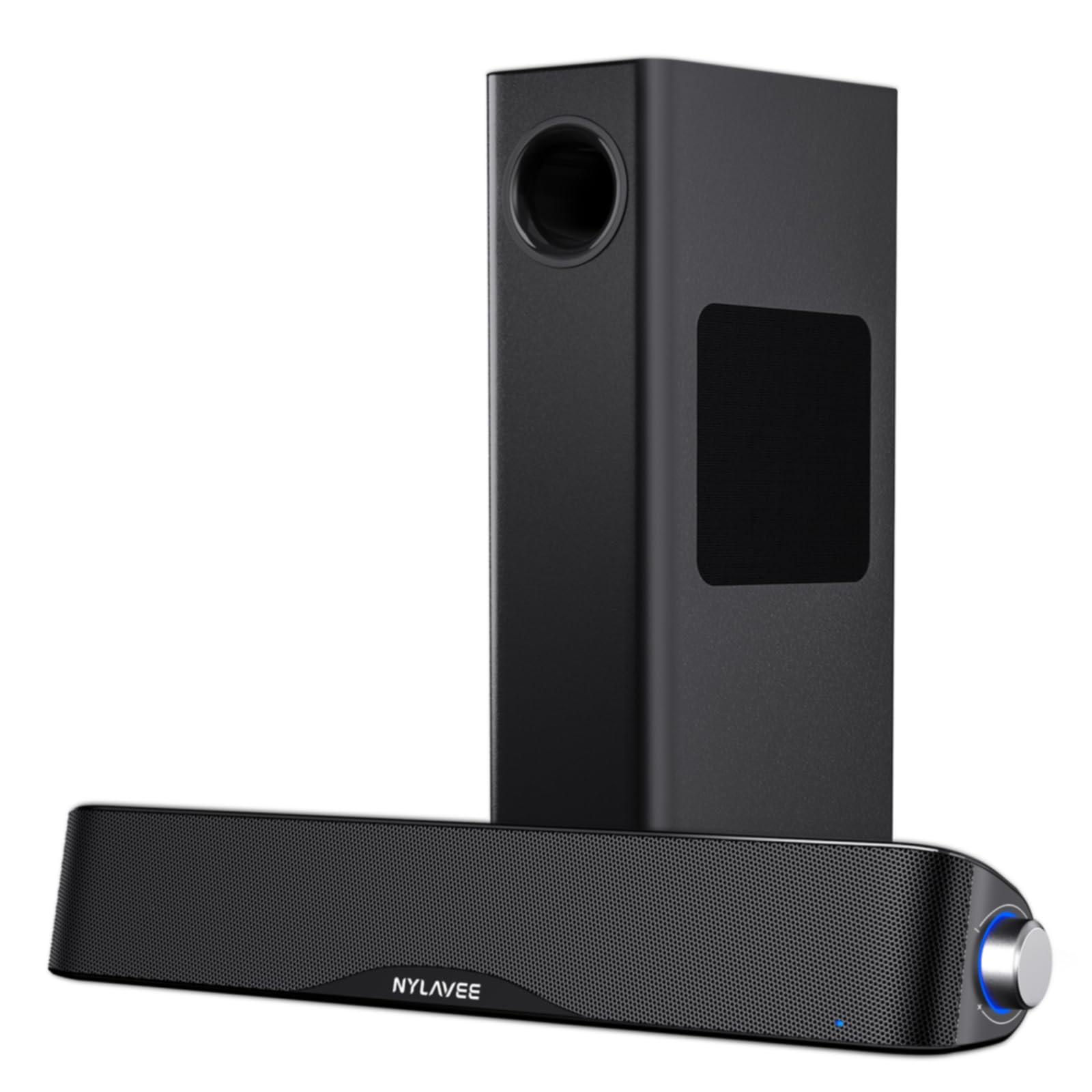
- Includes a soundbar and wired subwoofer with a 5.25-inch bass driver.
- Supports Bluetooth 5.4 and AUX input.
- A side knob handles power, mode switching, and volume.
Best For: Desktop or console users who want Bluetooth alongside a dedicated wired subwoofer.
Compact Wireless Pair with USB-C DAC
Audioengine A2+ Wireless Computer Speakers – Bluetooth Desktop Speakers with 24-Bit DAC for PC, Mac, Gaming and Music - Red
The Audioengine A2+ Wireless is a powered stereo pair designed for nearfield listening, so it suits a computer desk where speakers sit close to the listener. Its integrated 24-bit DAC connects to a computer through USB-C, while Bluetooth 5.3 aptX-HD supports wireless playback from phones, tablets, and computers.
RCA and 3.5mm AUX inputs add options for TVs, gaming systems, and other sources. The real wood cabinets and custom-tuned drivers give it a more traditional speaker look than plastic desktop units.
It is a focused stereo setup without a separate subwoofer.
Best For: A compact desk setup for listeners who want Bluetooth and direct USB-C audio.
| Pros | Cons |
|---|---|
|
|
Choose this pair if you want a compact computer-focused system with Bluetooth and direct USB-C audio in one setup. The RCA and AUX inputs also make it easier to share the speakers with other devices.
Consider whether the desk has room for a stereo pair and whether you need a separate subwoofer, which is not specified as included. If private listening matters, the A2 HD (HD3) adds a headphone amplifier, while this model's notes emphasize its 24-bit DAC and Bluetooth 5.3.
Simple Wired Speakers with Touch Lighting
Nylavee Computer Speakers for Desktop, PC Speakers with 6 Lighting Modes
The Nylavee SK400 keeps the desktop setup simple: USB supplies power, while a 3.5mm connection carries audio. It is a wired stereo option for a PC, laptop, phone, or tablet, with no drivers needed and no Bluetooth.
A single knob handles power and volume, and the speakers add six touch-controlled lighting modes for a more personalized gaming or work desk. The pair has dual-magnet full-range units and two speaker ports intended to add bass presence.
Check that your device has a 3.5mm audio output and that the listed 7-inch height fits the space.
Best For: Budget-minded desktop users who want straightforward wired audio and adjustable lighting.
| Pros | Cons |
|---|---|
|
|
This is a practical fit for a desk where wired operation and simple controls matter more than wireless streaming. The single knob avoids navigating software for basic volume changes, and the six lighting modes add a visual option without changing the connection setup.
Before buying, confirm the computer or monitor can provide 3.5mm audio and that the speakers' listed height fits beneath shelves or displays. Choose a Bluetooth model if you want to stream without an audio cable.
Subwoofer System with Reactive RGB Lighting
SteelSeries Arena 7 RGB Illuminated 2.1 Gaming Speakers with Powerful Bass, Subwoofer, and Bluetooth - For PC, PlayStation, Mobile
The SteelSeries Arena 7 combines a stereo speaker pair with a dedicated 6.5-inch downward-firing subwoofer, making it a gaming-oriented choice for users who want a fuller desktop system. Its two-way drivers use separate silk dome tweeters and organic-fiber woofers.
Reactive PrismSync lighting provides four zones that respond to on-screen events and music. Connectivity includes USB, Aux, optical, wired headset support, and Bluetooth for phones and other devices.
Sonar Software offers a 10-band parametric EQ and spatial audio simulation. The additional subwoofer and software controls call for more setup space and attention than a basic powered pair.
Best For: PC and console gamers seeking a subwoofer, Bluetooth, and customizable lighting.
| Pros | Cons |
|---|---|
|
|
Choose the Arena 7 if you want gaming features, multiple connection types, and a separate subwoofer in one system. Its lighting response and Sonar controls provide more customization than simple plug-and-play speakers.
The tradeoff is a larger setup to accommodate the subwoofer, so check the available floor or desk area before buying. For a smaller desktop footprint, the Audioengine A2+ focuses on nearfield listening, while this SteelSeries system gives bass and gaming customization a larger role.
Wired Bookshelf Pair for a Larger Listening Area
Audioengine A5+ Wired Bookshelf Speakers – Powered Speakers for Turntables, Vinyl Records, Music Streaming and Home Theater - White
The Audioengine A5+ is a powered bookshelf pair that can serve a computer while also connecting to a turntable, TV, or gaming console. It uses RCA and 3.5mm AUX inputs, with 150 watts of clean audio output described in the product notes.
Its custom-tuned components are aimed at high-fidelity playback, and the wood cabinets give it a conventional bookshelf-speaker form. This is a wired system with no Bluetooth, so it suits a fixed listening setup better than a cable-free desktop.
Consider the room and shelf space available because the supplied details do not give the speakers' dimensions.
Best For: Listeners who want powerful wired speakers for a computer and other room audio sources.
| Pros | Cons |
|---|---|
|
|
Consider the A5+ if you want one wired speaker pair to serve a computer and other home audio sources. Its RCA and AUX inputs provide flexibility, and the 150-watt figure makes it distinct from compact desktop pairs in the candidate group.
The concrete tradeoff is wireless convenience: Bluetooth is not supported, so plan on a wired source connection. Check physical fit before choosing it for a computer desk, since the product details here identify it as a bookshelf design but do not provide dimensions.
Desktop Speakers with Headphone Output
Audioengine A2 HD (HD3) Wireless Computer Speakers – Bluetooth Desktop Speakers with DAC, Headphone Amplifier and USB Audio - Black
The Audioengine A2 HD (HD3) is a compact powered stereo system for computers, laptops, gaming systems, and home offices. It combines Bluetooth aptX HD with a USB DAC, plus USB, RCA, and 3.5mm AUX inputs for wired sources.
Its distinguishing desktop feature is the built-in headphone amplifier and front-panel headphone output, letting listeners move between speaker playback and private listening. Handcrafted wood cabinets and custom-tuned drivers round out the setup.
As with any small pair, check the available desk space and think about whether its headphone connection is more useful to you than a separate subwoofer.
Best For: Computer listeners who switch between speaker playback and wired headphones.
| Pros | Cons |
|---|---|
|
|
This model fits listeners who want desktop speakers and an easy way to switch to wired headphones. Bluetooth aptX HD and the USB DAC cover different computer and mobile listening arrangements, while RCA and AUX inputs expand the source options.
Choose it over a simpler pair if its headphone output will be used; if the main priority is bass from a dedicated subwoofer, the SteelSeries Arena or Nylavee SK100Pro includes one. Check desk space and package contents before purchase.
Slim Wired Pair with Nine Lighting Modes
Nylavee Computer Speakers, Plug-and-Play PC Speakers for Desktop & Laptop
The Nylavee SK700 is a wired stereo option with dual full-range speaker units and passive radiators intended to add depth. It connects through 3.5mm AUX, while USB or USB-C supplies power, and setup does not require drivers.
Nine lighting modes can be switched or turned off, making it easy to match a gaming desk or a cleaner work area. The product details give the speakers' width as 8.59 inches and describe a slim profile, plus a 4.5-foot cable intended to reach across a dual-monitor desk.
It does not provide Bluetooth, so audio remains cable-connected.
Best For: Users who want a slim desktop speaker pair with wired plug-and-play connections and lighting options.
| Pros | Cons |
|---|---|
|
|
Pick the SK700 if you want a wired, driver-free desktop setup with lighting you can turn off when you prefer a plain look. The 4.5-foot cable and stated width help assess whether it can sit across a multi-monitor desk.
It uses USB for power and AUX for sound, so check for both connections and plan to keep the audio cable in place. If wireless playback or a separate subwoofer is central to your setup, another candidate better matches that need.
Bluetooth 2.1 Soundbar and Subwoofer
Nylavee Computer Speakers with Subwoofer, 2.1 PC Soundbar, Bluetooth 5.4
The Nylavee SK100Pro pairs a computer soundbar with a wired subwoofer, forming a 2.1 setup for games, movies, and music. A 5.25-inch bass driver is specified, with 60 watts peak power and 30 watts RMS in the notes.
Bluetooth 5.4 supports wireless audio, while a 3.5mm AUX connection handles wired playback from compatible equipment. A side knob controls power, mode, and volume.
The system is adapter-powered rather than battery-powered, so plan for a nearby outlet and room for both soundbar and subwoofer. Check the product dimensions against your desk arrangement.
Best For: Desktop or console users who want Bluetooth alongside a dedicated wired subwoofer.
| Pros | Cons |
|---|---|
|
|
Choose the SK100Pro if you want a computer soundbar, a separate subwoofer, and both wireless Bluetooth and wired AUX playback. The side knob puts basic controls on the system itself.
Its adapter power and two-part layout mean it is best for a fixed setup with room for the subwoofer and access to an outlet. Compare this with the SteelSeries Arena if you also want reactive lighting and software audio adjustment; those features are not specified for the SK100Pro.
How to Choose Computer Speakers
How We Picked Computer Speakers
These picks cover the main ways people use computer speakers: compact stereo listening at a desk, wired plug-and-play audio, gaming setups with lighting, and systems with a separate subwoofer. We prioritized products whose supplied details identify computer or desktop use and provide a clear connection path, such as USB audio, USB power with AUX sound, Bluetooth, or RCA inputs.
We also included options for users who share speakers across a computer and other devices. The Audioengine models offer wood cabinets and several source connections, while the Nylavee choices emphasize direct desktop controls, lighting, or a soundbar form.
The A5+ serves a larger wired listening setup, and SteelSeries Arena 7 brings gaming-oriented lighting and software controls.
Comparing Computer Speakers
The most important divide is between compact powered pairs and systems with a separate bass unit. The Audioengine A2+ Wireless and A2 HD (HD3) are desktop-focused stereo pairs with wireless and wired connections.
The SteelSeries Arena 7 and Nylavee SK100Pro add subwoofers, so they suit listeners who want a more involved gaming or movie setup and have space for another component.
Connection flexibility varies too. The A2+ Wireless has USB-C, RCA, AUX, and Bluetooth; the A2 HD adds a headphone amplifier and output.
The A5+ is wired through RCA and AUX, while the Nylavee SK400 and SK700 use AUX for audio and USB for power. Confirm which ports your computer provides before choosing, especially with USB-powered speakers whose USB cable does not carry audio.
| Product | Standout features | Best for |
|---|---|---|
| Audioengine A2+ WirelessCheck Price |
| A compact desk setup for listeners who want Bluetooth and direct USB-C audio. |
| Nylavee SK400 Computer SpeakersCheck Price |
| Budget-minded desktop users who want straightforward wired audio and adjustable lighting. |
| SteelSeries Arena 7Check Price |
| PC and console gamers seeking a subwoofer, Bluetooth, and customizable lighting. |
| Audioengine A5+Check Price |
| Listeners who want powerful wired speakers for a computer and other room audio sources. |
| Audioengine A2 HD (HD3)Check Price |
| Computer listeners who switch between speaker playback and wired headphones. |
| Nylavee SK700 Computer SpeakersCheck Price |
| Users who want a slim desktop speaker pair with wired plug-and-play connections and lighting options. |
| Nylavee SK100Pro 2.1 SpeakersCheck Price |
| Desktop or console users who want Bluetooth alongside a dedicated wired subwoofer. |
Choosing Desktop Speakers for Your Setup
For a tidy desk, consider how each pair connects and where its controls sit. The SK400 uses a single volume and power knob, while the SK700 includes a 4.5-foot cable and a stated width to help plan placement.
The Audioengine A2+ and A2 HD are designed for nearfield or desktop listening, but check their dimensions if monitor stands, shelves, or other equipment limit available space.
If the speakers will serve multiple devices, count the sources you expect to connect. Bluetooth can simplify switching from a computer to a phone, while RCA and AUX inputs can help accommodate a TV, turntable, or console.
The A2+ Wireless and A2 HD combine wireless and wired options. The A5+ supports several wired sources but does not support Bluetooth.
Gaming Speakers, Bass, and Lighting
A dedicated subwoofer changes the physical setup as well as the sound system. Arena 7 includes a 6.5-inch downward-firing subwoofer, and the SK100Pro pairs a soundbar with a wired 5.25-inch bass driver.
Check whether you can place that extra unit near the desk and route its cable. A compact stereo pair may be easier to position when space is limited.
Lighting is another clear difference among desktop speakers. Arena 7 has four reactive zones tied to screen activity and music; the SK400 has six touch-controlled modes, and the SK700 has nine modes that can be switched off.
Choose based on whether lighting is part of your desk setup or something you would rather disable.
Which Computer Speakers Fit Your Workday?
For everyday calls, podcasts, music, and games, start with the connection and control style you will actually use. A wired AUX pair keeps setup direct, while Bluetooth can reduce cable changes when phones and computers share the speakers.
If you regularly use headphones, the A2 HD (HD3) has a front-panel headphone output and built-in amplifier.
For a desk that also serves as a room audio station, the A5+ accepts a computer along with TVs, consoles, and turntables through wired inputs. If gaming is the main use and you want subwoofer bass, compare the Arena 7 and SK100Pro by their connection and control features.
Before ordering, verify dimensions, cable reach, power access, and input compatibility against your actual desk.
Who Should Buy Which Computer Speakers?
Choose the Audioengine A2+ Wireless for compact desktop listening with USB-C DAC, Bluetooth, and several wired inputs. Choose the A2 HD (HD3) if its headphone amplifier and front output will help you move between speakers and private listening.
The A5+ is the wired choice for a broader computer and home audio setup.
For straightforward AUX-connected desktop sound with lighting, the Nylavee SK400 and SK700 offer single-knob or multi-mode lighting features. The SK700 adds a stated cable length and slim profile; the SK400 keeps controls simple and makes its 3.5mm audio requirement explicit.
Choose SteelSeries Arena 7 for a gaming-oriented subwoofer system with reactive lighting and software controls, or Nylavee SK100Pro for a Bluetooth 2.1 soundbar-and-subwoofer setup with a side control knob.